Local-first · AES-256 Encrypted · Offline-ready
Encrypted sync · Pro

Your  invoices.
Your  device.
Your  rules.

Free: your data never leaves your device — AES-256 encrypted, fully offline. Pro: add AES-256 encrypted sync across all your devices, so servers only ever see encrypted bytes.

Free forever plan available · No credit card required

Android & iOS
macOS & Windows
AES-256 encrypted
Works offline
See it in action

From new quote to signed and paid

Every screen below is Quotes running on a real device with seeded demo data, not a mockup — shown in both light and dark, since the app follows your system theme.

1
Dashboard

See your business at a glance

Invoiced totals, open quotes, and what's still owed to you — plus your most recent documents, right on the home screen.
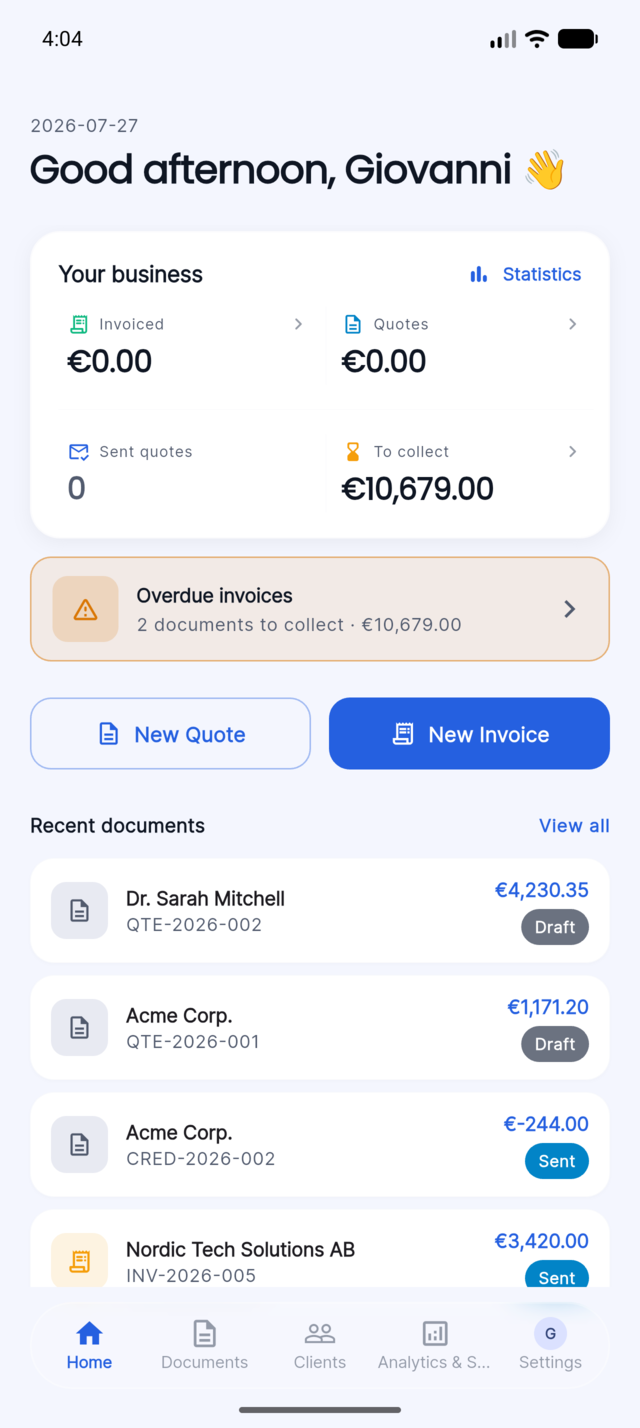
Quotes app home screen showing invoiced total, open quotes, amount to collect, and a list of recent documents
2
Create

Build a quote, line by line

Add items, group them into phases, and let Quotes work out quantities, VAT, and totals for you as you type.
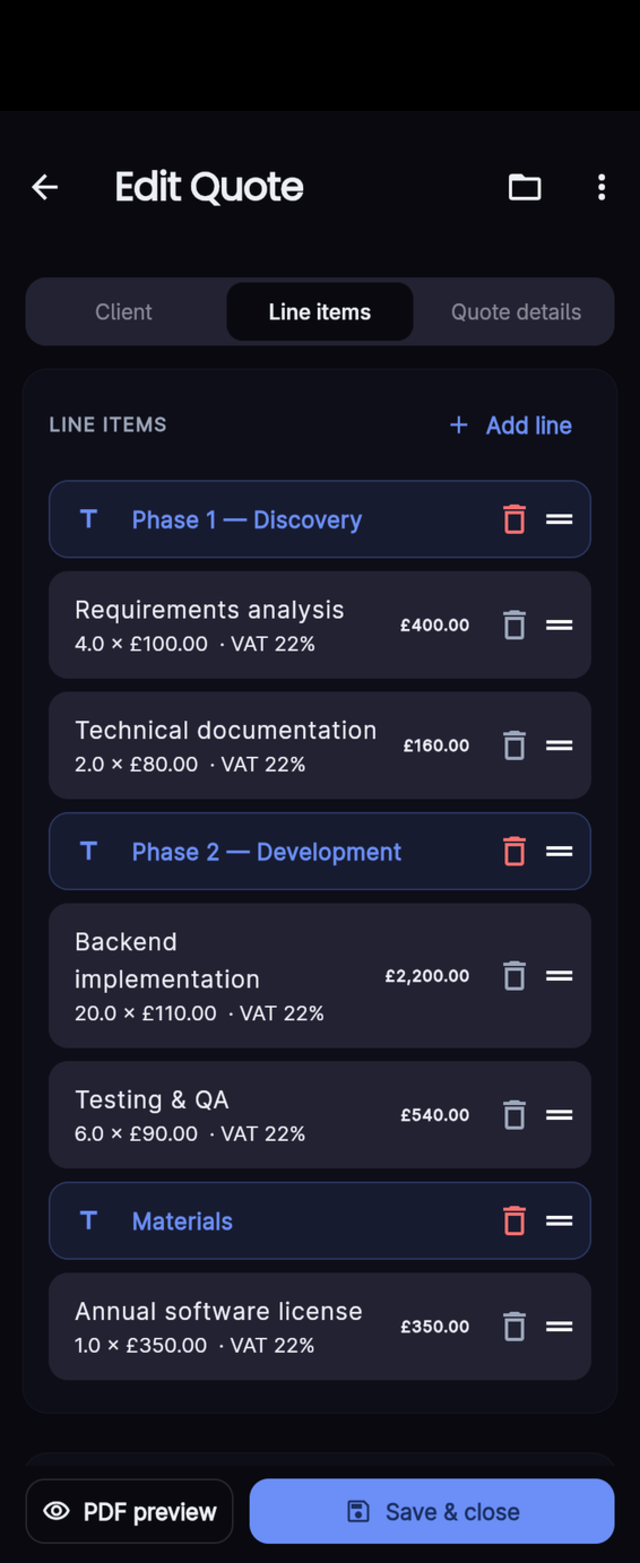
Quotes app quote-editing screen with line items grouped into phases, quantities, unit prices, and VAT
3
Assign client

Attach it to a client in one tap

Search your saved clients by name or VAT number and pick one — their details fill in automatically.
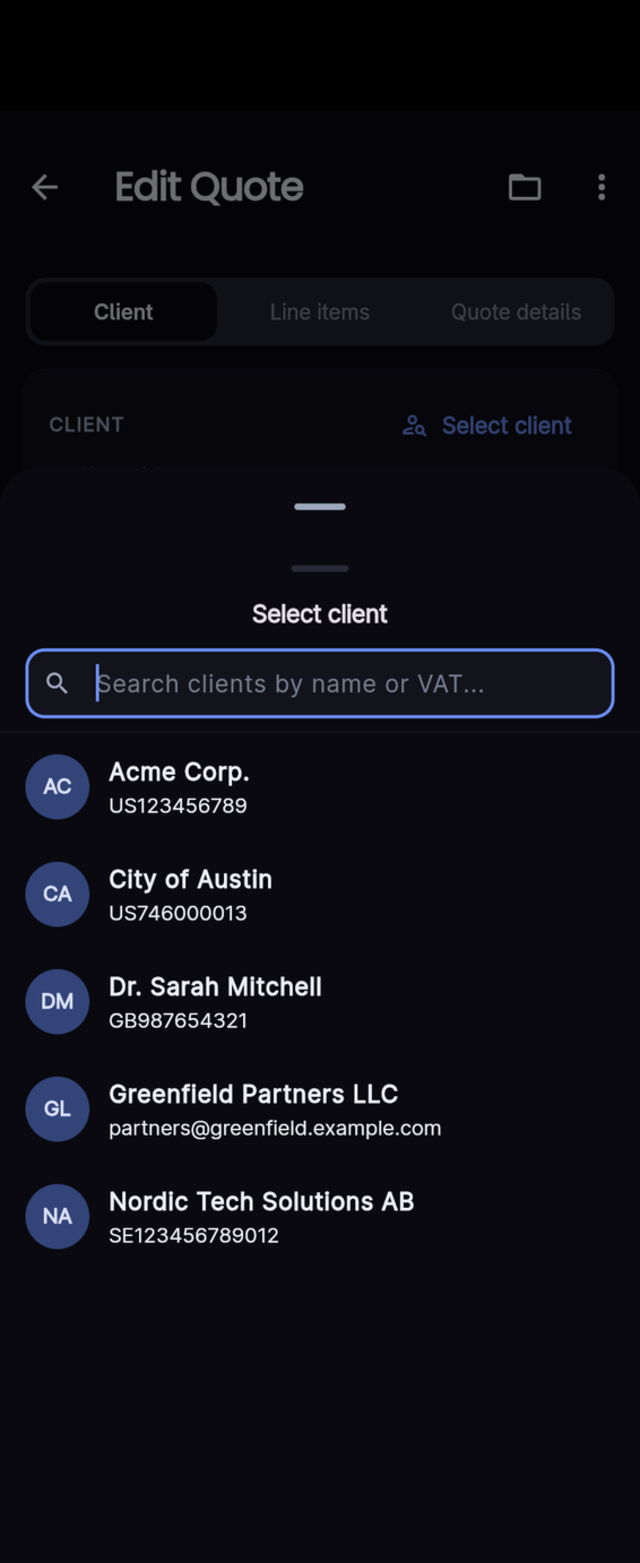
Quotes app client picker sheet with a search box and a list of saved clients showing their VAT numbers
4
Review

Everything on one screen

Total, client details, and itemized pricing together, with one-tap actions to export or send for approval.
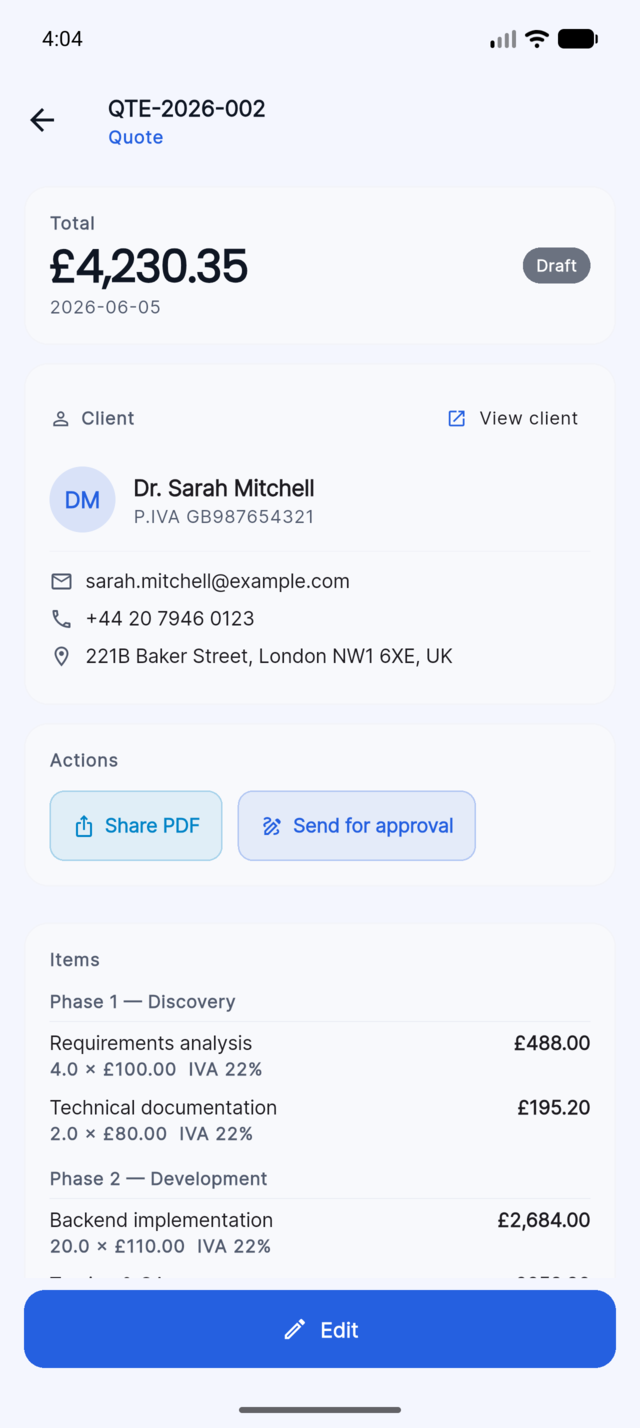
Quotes app screen showing an itemized client quote with total, client details, and PDF sharing actions
5
Export

Turn it into a polished PDF

A clean, client-ready document generated on your device — ready to print or attach anywhere.
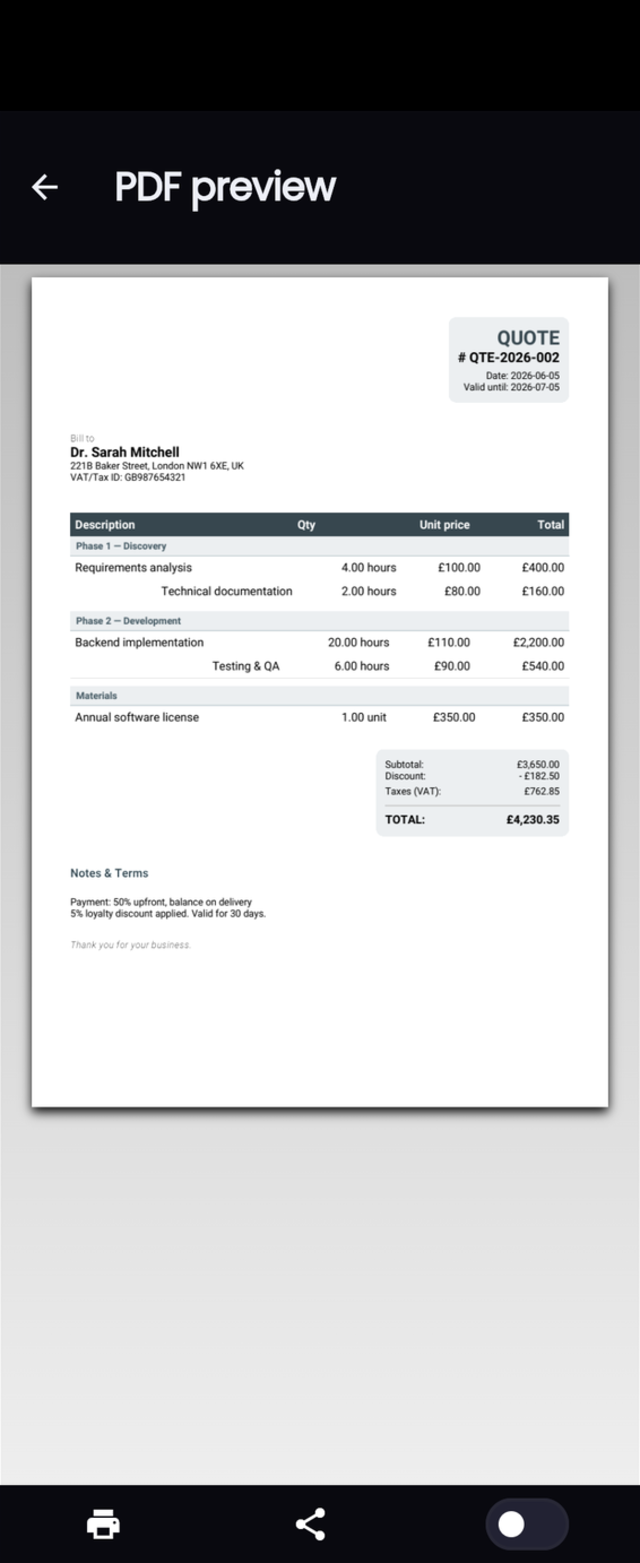
Quotes app PDF preview screen showing the rendered client quote with itemized pricing and totals
6
Share

Send a secure link for approval

Your client views and approves the document straight from their browser — no app to install, link expires automatically.
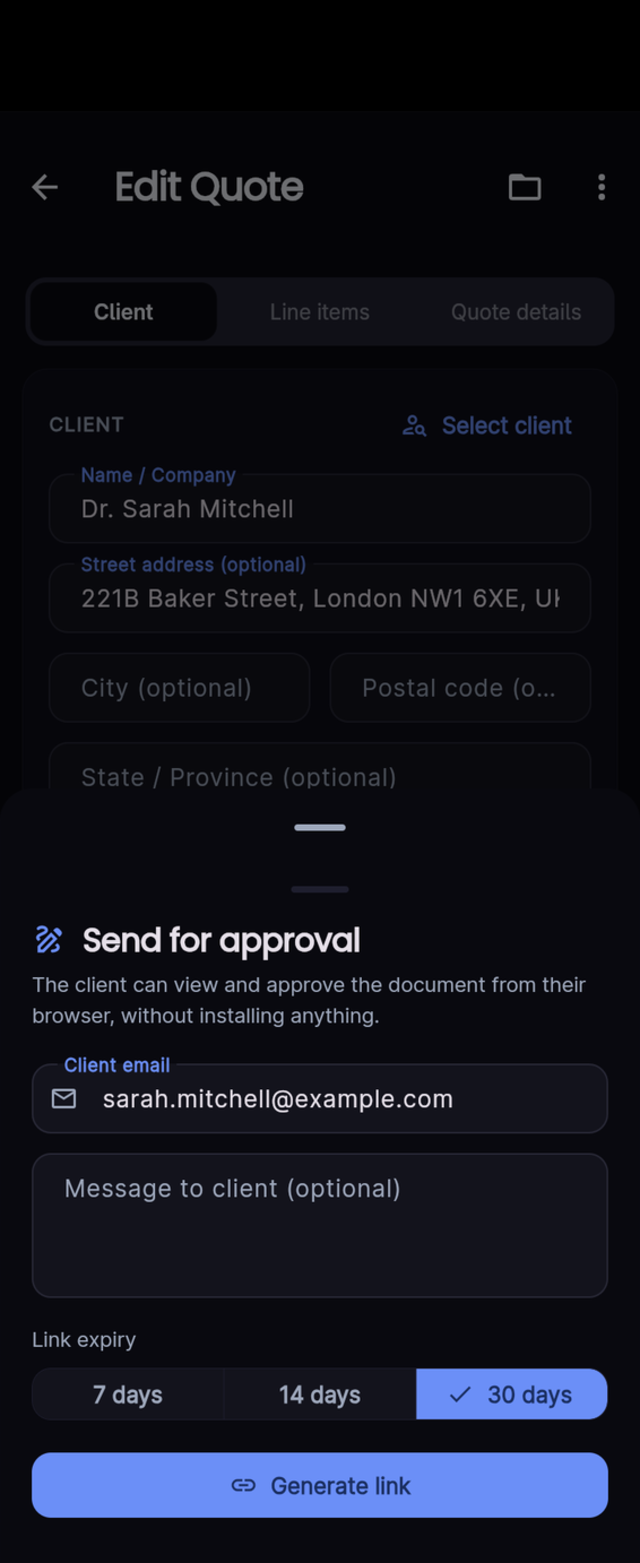
Quotes app send-for-approval sheet with client email, optional message, and link expiry options
Features

Everything you need.
Nothing you don't.

Built for freelancers, consultants, and small businesses who want professional invoicing without the complexity.

Documents

Estimates & Invoices

Create professional estimates and convert them to invoices in one tap. Supports estimates, invoices, and credit notes.

1-Click Conversion

When a quote is accepted, convert it to an invoice instantly — all line items, discounts, and client details preserved.

Credit Notes Pro

Issue credit notes linked to the original invoice with negative line items. Document history stays intact and traceable.

PDF & Export

3 PDF Templates

Choose from Classic (free), Modern, and Minimal. Your logo and branding appear on every page.

CSV Export

Export all documents as UTF-8 CSV with one click. Open in Excel, Google Sheets, or import into your accounting software.

Digital Signature Pro

Send a signing link to your client. They sign from any browser — no app needed. Document is marked accepted when signed.

Built for your business

Simple, Secure, and Professional

Whether you use our Free plan for basic invoicing or upgrade to Pro for seamless sync, Quotes is designed to make you look good while keeping your data safe.

Intuitive Design

No learning curve. A beautifully simple interface that works exactly the same way on your phone, tablet, and desktop.

Private by Default

Your financial data stays yours. Everything is stored and encrypted directly on your device, keeping you fully in control.

Stand Out

Generate crisp, elegant PDFs in seconds. Impress your clients with a polished image that reflects the quality of your work.

Sync & Go Pro

Start on mobile, finish on desktop. Your encrypted archive syncs seamlessly across all devices, so you're always ready to bill.

Platforms

One app, every device

Native performance on each platform — built with Flutter.

Android
Material You · Play Store
iOS & iPadOS
iPhone · iPad · App Store
macOS
Mac App Store · Universal
Windows
Windows 10/11 · Installer
Privacy by design

Privacy matters.
But so does flexibility.

Most invoicing apps store your financial data on their servers without asking. Quotes doesn't — not by default. Every document is AES-256 encrypted on your device before it ever touches disk.

AES-256-CBC encryption
All documents, clients, and settings encrypted with AES-256 before saving. Each write uses a fresh random IV.
User-derived key
The encryption key is derived from your identity — unique to you, never transmitted, useless to anyone without your account.
Encrypted sync Pro
Blobs uploaded for sync are encrypted with AES-256 before they leave your device — we custody encrypted bytes, not your data.
Encryption flow
1
Document JSON serialised in memory
2
Random 16-byte IV generated
3
AES-256-CBC encryption with user key
4
Base64(IV):Base64(cipher) saved to disk
Result on disk
Unreadable without your account key
Pricing

Start free. Upgrade when ready.

The Free plan is fully available now. Pro is under active development — see what's coming.

Free
Available now
€0
Forever. No credit card required.
  • Up to 10 estimates + 10 invoices
  • Classic PDF template
  • Client management
  • CSV export
  • Partial payments
  • Current-year statistics
  • Local AES-256 encryption
  • Fully offline
  • Data never leaves your device
Download free

Both plans are fully usable today. Pro unlocks unlimited documents, e-signature, credit notes and more — subscribe anytime from within the app.

FAQ

Common questions

Is Quotes really free? What are the limits? +
Yes. The Free plan is limited to 10 estimates and 10 invoices. Feature limitations: one PDF template (Classic), current-year statistics only, and no digital signature, credit notes, document templates, FatturaPA export, backup/restore, or sync. No time limit — upgrade to Pro for unlimited documents and the full feature set.
Where is my data stored? Can you see it? +
All documents, clients, and settings are stored locally on your device, encrypted with AES-256. We cannot see your data — it is never sent to our servers. Firebase is used only for authentication and for the digital signature feature.
How does sync work without compromising privacy? +
Pro sync encrypts your data with AES-256 before it ever leaves your device, so our servers only ever store encrypted blobs.

The encryption key is derived from your Firebase account identifier rather than a separate passphrase, so this is not a zero-knowledge system in the strict sense — in principle, someone with access to both our infrastructure and your account identifier could derive the same key. We never access, inspect, or share your content; see our privacy policy for full details.
What happens if I lose my phone / reinstall the app? +
Since data is local-first, losing your device means losing your local data unless you have a backup. Use Backup & Restore (Pro) to export an encrypted ZIP regularly. With Pro sync enabled, your data is automatically recoverable on a new device — just log in with the same account.

Get Quotes — free forever.

Available on every platform you use. Start for free, upgrade when your business needs more.